The digital tumor board room

Complete cases before the meeting, a structured decision during it, a signed report after. OncoRoom replaces paper, WhatsApp, Word and USB drives with one room.

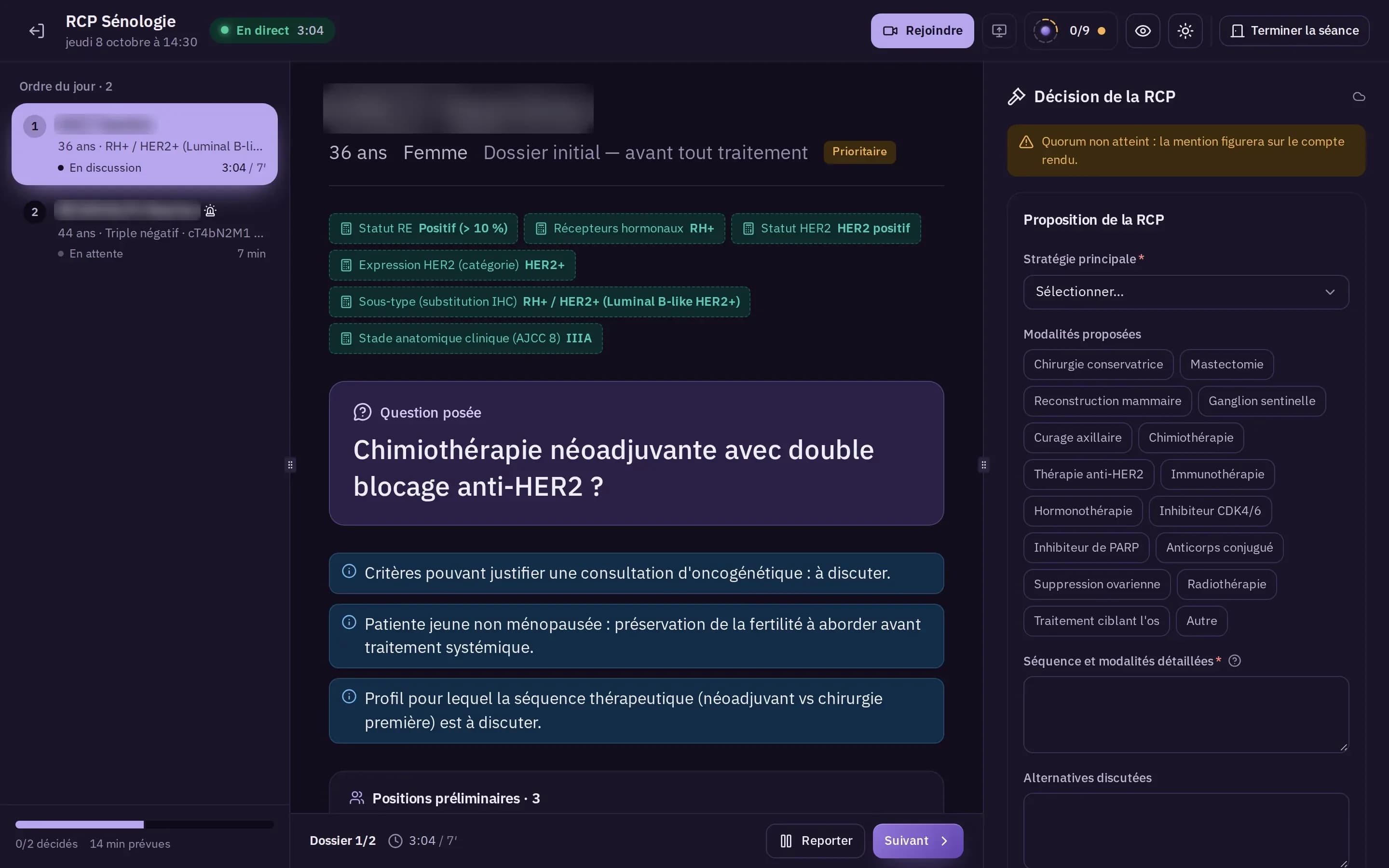
Top of the tumor board room screen: live meeting, agenda, case under discussion.

OncoRoom in numbers

OncoRoom offers 3 interface languages , runs 11 completeness checks on senology cases before the agenda and counts 3 specialty packs .

First a complete case, an agenda, a meeting. Then a signed report.

OncoRoom follows the case from one end to the other, in the order the work happens.

  1. beforehand

    Prepare

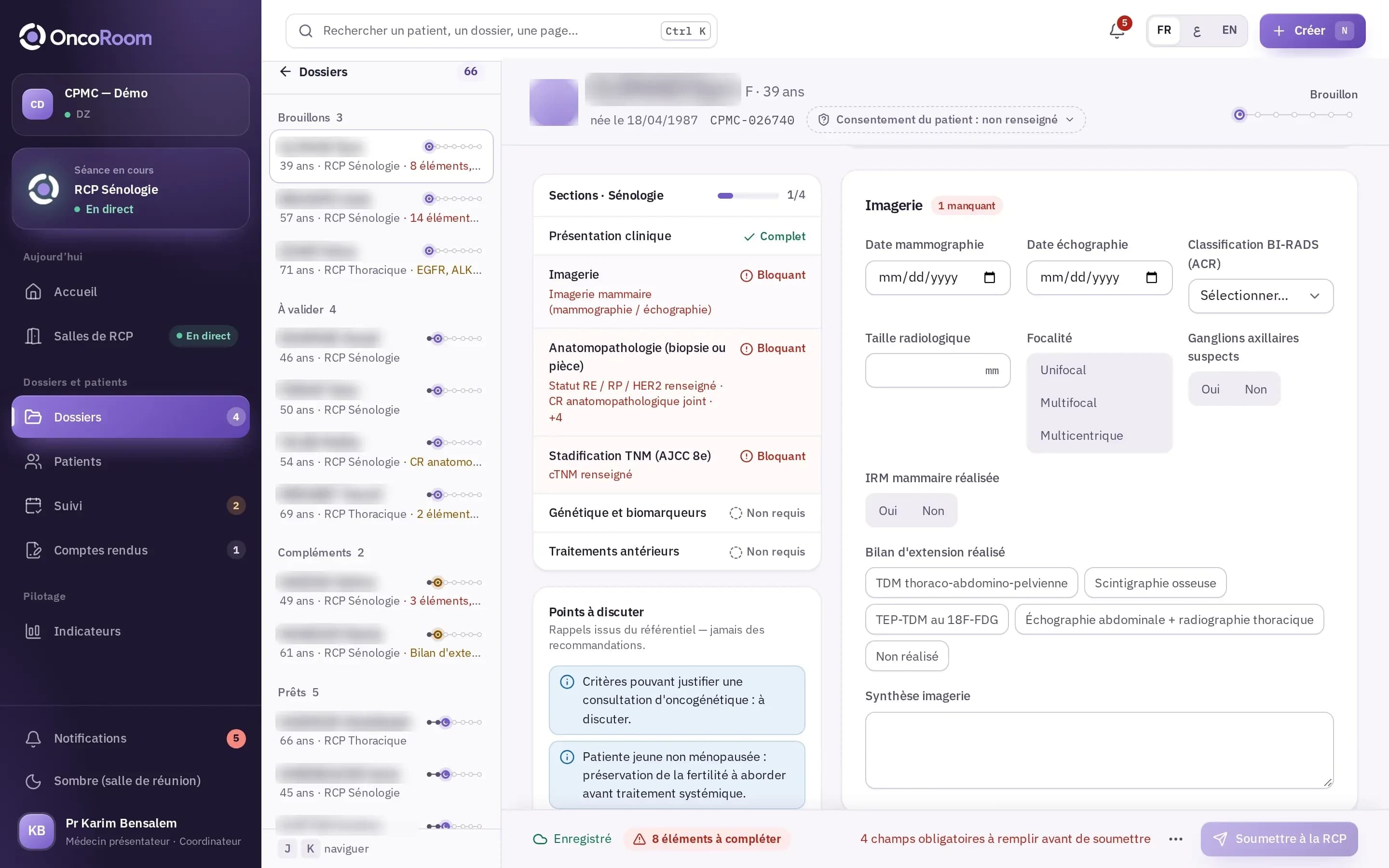
    The presenting physician fills in the specialty pack’s form. The draft saves automatically; the completeness indicator lists what is missing and leads to the field concerned.

    The case and its completeness
    Senology case form in draft: sections, blocking items, “Submit to the tumor board” button.
  2. before the meeting

    Convene

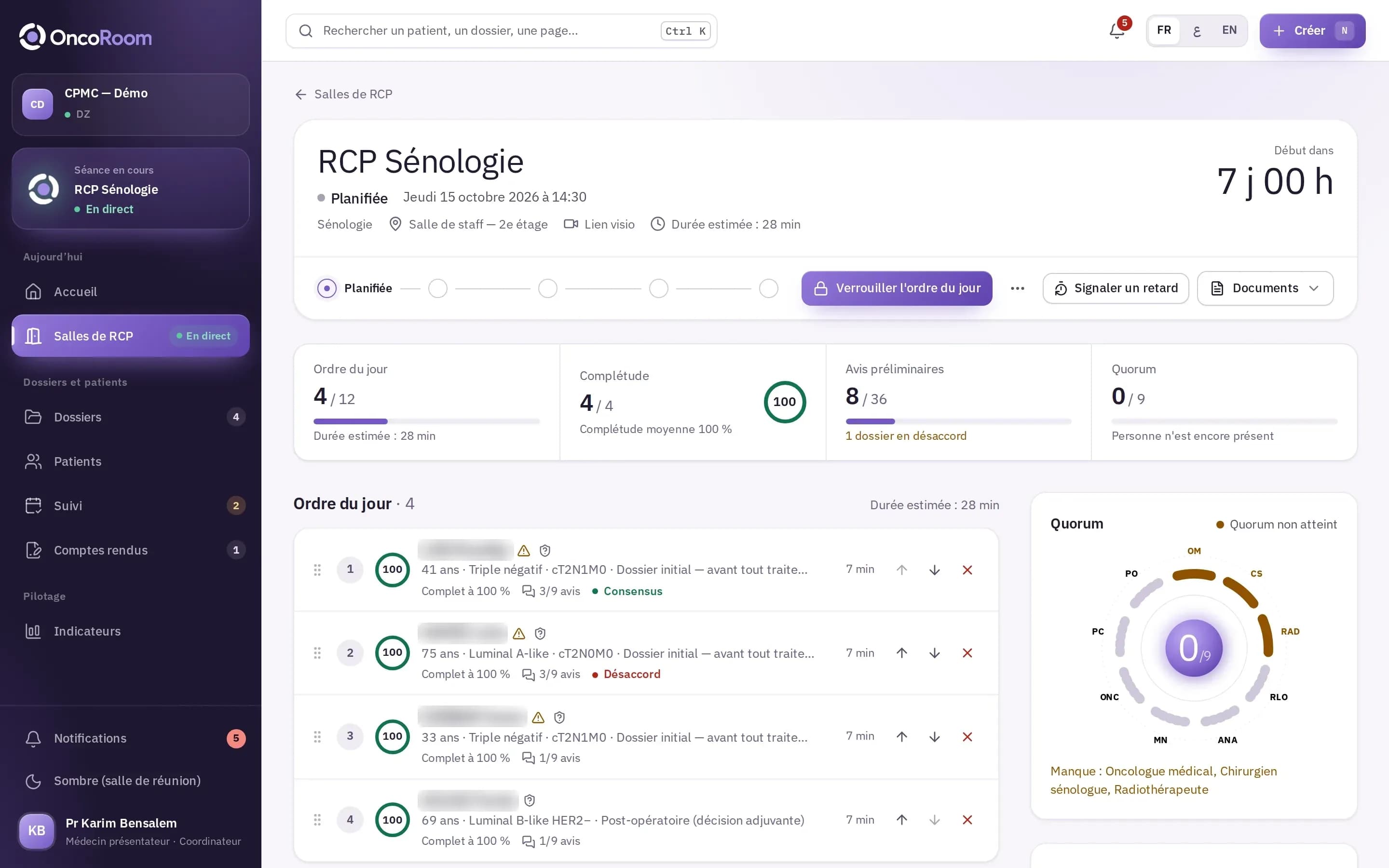
    The coordinator builds the agenda from the cases that are ready; the estimated duration of the meeting is shown. Each member gives a preliminary opinion: disagreements are known before entering the room.

    The agenda and the quorum
    Page of a scheduled meeting: agenda, completeness, preliminary opinions, quorum round table.
  3. in the meeting

    Decide

    A single screen, designed to be projected: the current case, the question asked, the specialty pack’s decision form, the level of consensus and the dissenting opinions.

    The live meeting
    Tumor board room in dark mode: agenda, current case, decision panel.
  4. after the meeting

    Document

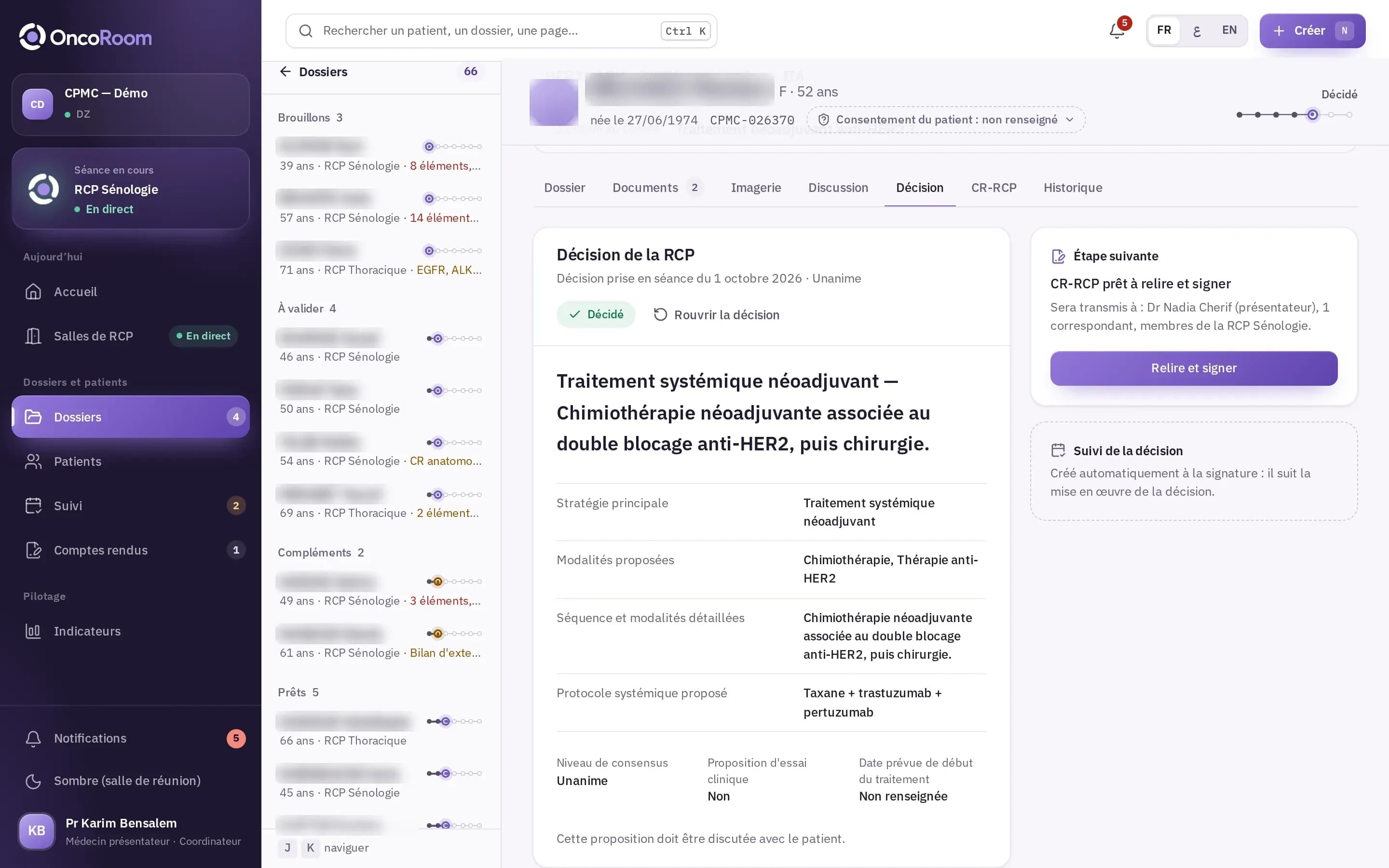
    The validated decision generates the draft report. The coordinator reviews it and signs it after re-authenticating; the signed report is then distributed. The notification email contains no medical data.

    From draft to signed report
    A case’s Decision tab: tumor board decision, next step “Report ready to review and sign”.

Nothing to retype, nothing to guess.

What OncoRoom checks, calculates and records while the team discusses the patient.

Complete cases before the meeting

The specialty pack checks the completeness of each case from the moment it is entered: missing items are listed and one click leads to the field concerned. An incomplete case is added to the agenda only with a reasoned exemption from the coordinator.

Stage and subtype, calculated

The specialty pack derives the stage and subtype from the data entered. These values are shown apart, marked “to verify”; none is applied automatically.

Attendance and quorum

During the meeting, attendance is recorded and compared with the specialties the specialty pack requires. If the quorum is not reached, this is stated on the report.

A signed report, frozen

Once signed by the coordinator, the report can no longer be changed. A correction creates a new version; the old one stays available, marked “Superseded”.

Every access, logged

Every view and every change of a case or a report is entered in the audit log. Its entries can be neither modified nor deleted.

French, Arabic, English

Each user chooses the language of their interface. Arabic is displayed right to left; clinical codes (TNM, AJCC) stay in Latin characters.

The meeting, projected.

A single screen for the whole room: the current case, the calculated values, the question asked and the decision to validate.

  1. The tumor board room in dark mode: on the left the agenda, in the centre the case under discussion with its calculated values and the question asked, on the right the tumor board’s decision.

    The agenda

    Each case appears there with its status and its timer. The coordinator moves to the next case, or postpones a case and gives the reason.

  2. The current case

    The question asked, large; the calculated values; the specialty pack’s reminders: points to discuss, never recommendations.

  3. The decision

    Strategy, modalities, level of consensus, dissenting opinions, clinical trial proposal: the decision form comes from the specialty pack.

Capture of the room in dark mode, on the demonstration institution. Names blurred, synthetic patients.

  • Follower mode

    Remote participants open the same meeting: their screen follows the case displayed by the coordinator.

  • Maskable identity

    When projecting, the patient’s identity can be masked when people outside the care team are in the room.

  • By keyboard

    N next case, P postpone, Ctrl + Enter validate the decision.

What the room produces.

The report is not retyped after the meeting: every line comes from the case, the meeting or the signature.

  • From the caseThe patient’s identity, the reason for presentation, the question asked and the values calculated by the specialty pack.
  • From the meetingAttendance, quorum, the tumor board’s proposal and the level of consensus.
  • From the signatureThe signatory, the date of signature and the fingerprint of the frozen document.

From draft to signed report

ReportVersion 1 SignedExample · synthetic patient

CPMC — Demo

Tumor board report

Reference CPMC-026370
Version 1

Institution
CPMC — Demo
RCP
RCP Senology
Meeting date
01/10/2026
Format
Hybrid

Patient

Full name
Synthetic patient
Sex
F · 52 years
Date of birth
27/06/1974
Case no.
CPMC-026370

Presentation

Reason
Initial case, before any treatment
Presenting physician
Dr Nadia Cherif
Question asked
Neoadjuvant anti-HER2 treatment?

Calculated data (to verify)

Calculated by the specialty pack from the case

ER status Negative (< 1%) HER2 status HER2 positive Subtype (IHC surrogate) HER2+ / HR− (HER2-enriched) Clinical anatomic stage (AJCC 8) IIA

Participants

Attendance and quorum recorded during the meeting

Quorum reached

Medical oncologist · Breast surgeon · Radiation oncologist · Radiologist · Pathologist

Tumor board proposal

Decision validated in the meeting, form from the specialty pack

Neoadjuvant systemic treatment. Neoadjuvant chemotherapy combined with dual anti-HER2 blockade, then surgery.

Proposed systemic protocol
Taxane + trastuzumab + pertuzumab
Consensus
Unanimous
Clinical trial
No trial proposed

This proposal must be discussed with the patient.

Signature

Signed after re-authentication; the document can no longer be changed

Electronically signed by Pr Karim Bensalem on 01/10/2026

Frozen document

sha256 fingerprint · 9f2c41d7a6e05b38c1f47d2e8a90b6c3 (example value)

Report rebuilt for illustration, from the demonstration institution. All data is synthetic.

The demonstration follows a complete tumor board, from preparation to the signed report.

One platform, one specialty pack per tumor board.

Forms, staging, required specialties, decision options and report sections come from the specialty pack, not from custom development.

Your health data, within the framework of Algerian law.

OncoRoom is designed so that your institution handles its tumor board cases in compliance with the law on the protection of personal data.

Law no. 18-07 of 10 June 2018 on the protection of natural persons in the processing of personal data. Your institution remains the data controller; Unimed acts on its behalf, as processor, within a framework set by contract.

  • Who has access

    Only the professionals you authorise, according to their role in each tumor board, with mandatory two-factor authentication. The Unimed team opens no case without your institution’s agreement.

  • What is traced

    Every view and every change of a case or a report is recorded in a log that your institution can read and export.

  • Whose data it is

    Your institution’s. It is hosted in Algeria, can be exported on request and is returned to you at the end of the contract.

  • Who to ask

    Your IT department or data protection officer writes to us through the demo request form: we answer point by point, before any commitment.

Read the Security and compliance page

Before requesting the demo

For any other question, use the demo request form: we answer it during the demonstration.

A Unimed operator creates your institution’s space. The first administrator receives an invitation, activates two-factor authentication, then creates the tumor boards and invites the users.

The schedule depends on the number of tumor boards and users: we set it with you after the demonstration.

The institution remains responsible for its data; Unimed hosts and processes it on its behalf. Lists and indicators export as CSV, reports as PDF. At the end of the contract, a complete export is handed over to the institution.

Not today. Patients are created in OncoRoom or imported in batch from a file. A connector per hospital is planned; we do not announce it until it is delivered.

The application includes a help centre and a guide for each role: coordinator, presenting physician, tumor board member, secretariat, administrator. A hands-on training accompanies go-live.

The interface exists in French, Arabic (right to left) and English. Each user chooses theirs; clinical codes stay in Latin characters.

No, by choice: consent and retention period must be settled first. The trace of the meeting is the validated decision and the signed report.

Request a demo

Tell us your role and your institution. A member of the Unimed team replies by email and arranges the demonstration with you.

  • On synthetic data We present a complete tumor board, from preparation to the signed report, in a demonstration institution.
  • Your specialty, your boards Together we look at the pack that concerns you and how your meetings are organised.
  • No patient data This form only asks for professional contact details.
We reply by email, at the address you give.